App User Guide

Quick answers about features and how FitLiftLog works.

What should I do first after I register?
Open the main menu in the bottom-right corner of the app, go to your profile, and choose your default training goal. This helps FitLiftLog tailor feedback and coaching to the way you train.
Do I need to create a routine?
No. You can create routines for workouts you repeat often, or you can use Quick Start and add exercises on the fly. Routines are helpful when you want your exercises saved in the order you usually perform them.
How do I create a routine?
Open the main menu and choose Manage Routines. From there, you can create a routine, add exercises, and arrange them in the order you want to perform them during a session.
How do I create custom exercises?
Open the main menu in the bottom-right corner of the home screen and choose My Exercises. From there, you can add and manage custom exercises that match your training style.
How does AI feedback work?
After each completed session, FitLiftLog reviews your sets, volume, exercise history, and recent trends to generate clear feedback about the workout you just finished.
What is in-session coaching?
FitLiftLog can provide practical exercise-specific guidance, such as whether to add reps, hold the current weight, reduce load, improve execution, or push for a PR based on your recent performance and training goal.
Can I add notes for the AI coach?
Yes. Each exercise has a Notes for AI area where you can add context such as form, pain, fatigue, difficulty, or how the movement felt. These notes help FitLiftLog provide more useful coaching.
Can I see the history of my exercises?
Yes. Open the calendar, select a day, and choose a completed session. When reviewing that session, you can tap an exercise to view your history for that movement.
Does FitLiftLog record PRs?
Yes. When you log a set, FitLiftLog automatically checks whether it qualifies as a personal record. If it does, you will see a PR indicator on that set.
What does Copy do on the exercise screen?
Copy pulls in the last sets you performed for that exercise and adds them to the current session. This saves time when you repeat similar workouts. You can still edit the copied sets before saving.
Is my workout data private?
Yes. Your workout data is used to provide feedback and coaching for your account.
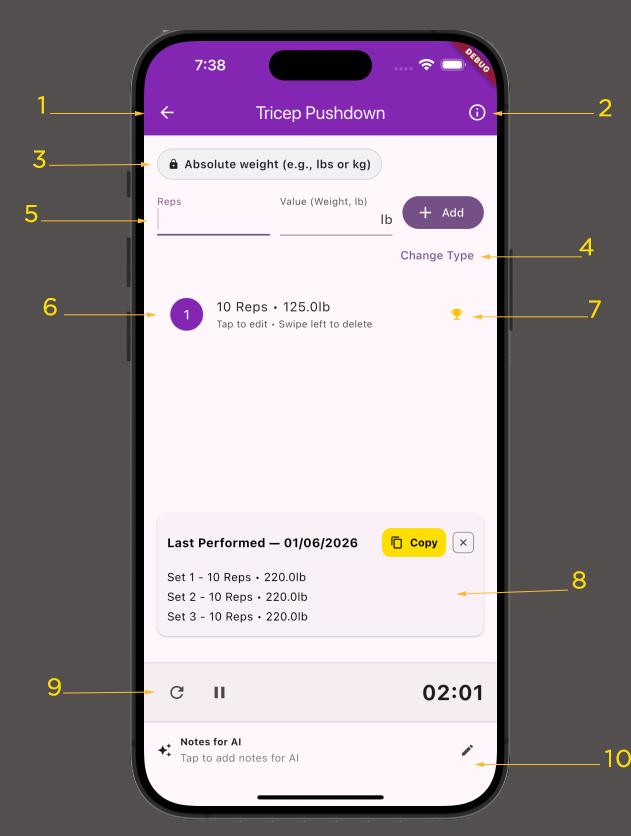
FitLiftLog exercise screen screenshot

Exercise Screen Overview

  1. Save/back button
  2. Exercise name and description
  3. Set type selector
  4. Option to change the exercise type
  5. Set entry area
  6. Recorded sets, which can be edited
  7. Personal Record icon, shown on PR sets
  8. Copy button to bring your last performed sets into the current session
  9. Rest timer
  10. Notes for AI coaching

How PRs work for weight-based exercises

For weight-based exercises, FitLiftLog evaluates PRs using both the weight lifted and the number of reps performed. This allows the app to recognize progress across different rep ranges, not just all-time max weight.

FitLiftLog tracks:

  1. Your best estimated overall strength
  2. Your best weight for a specific rep count

Because of this, a single set can result in more than one PR.

Example

If you log:

That set may create:

Later, if you log:

That can also be a PR because it is your best recorded weight for 7 reps.

Why FitLiftLog tracks PRs this way

This approach reflects how people actually train and rewards improvement even when you are not lifting a new all-time max.